Crafting rich USSD experiences
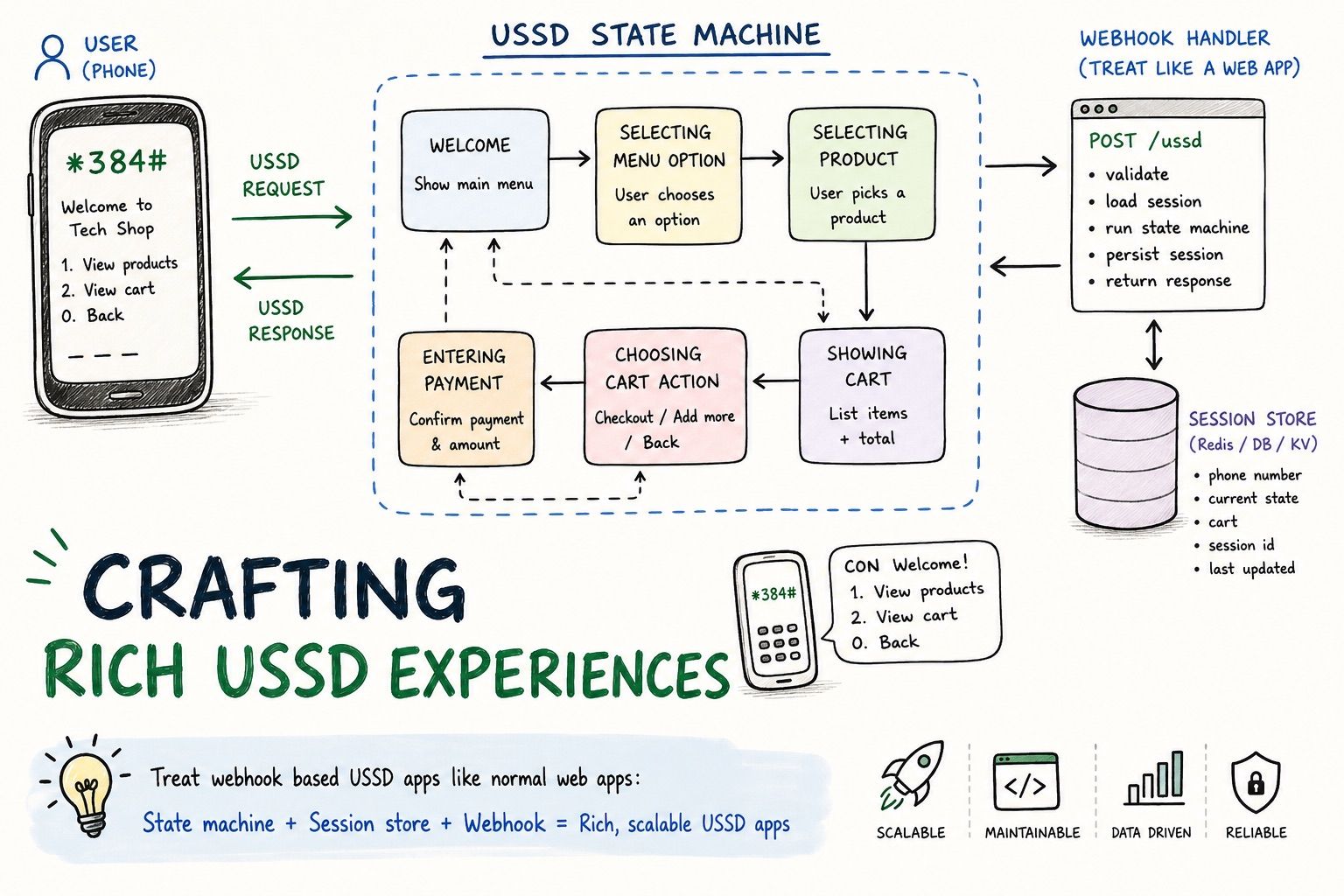
USSD applications are one of those things that are deceptively complex. My trick is to treat webhook based applications like normal web apps in order to make them work. In this article, I talk about how I do that.
# The issue with USSD applications
Imagine this. You have some business logic that needs to be available to users with feature phones without the internet. You have two options, two way SMS and USSD, and after sprint planning, you find that USSD is a good middle ground, so you start building.
Naturally, you look around to find a suitable provider and let us assume you land at Mobile Sasa for its friendly price and whatever your team is into It is day one of the sprint, and you find the snippet below on the docs.
// express.urlencoded() is required: we post form fields, not JSON.
app.use(express.urlencoded({ extended: false }));

app.post("/ussd", (req, res) => {
  const { sessionId, phoneNumber, text } = req.body;
  const input = (text ?? "").split("*").filter(Boolean);

  res.type("text/plain");

  if (input.length === 0) {
    return res.send("CON Welcome to Mobile Sasa\n1. Check balance\n2. Talk to us");
  }
  if (input[0] === "1") {
    return res.send("END Your balance is KES 12,340. Thank you!");
  }
  return res.send("END Call us on 0700 000 000. Goodbye!");
});
You look at it, and you are like. Huh! That’s so easy to do. They send you the phone number of the user, all the text they input during the session, then get the current input from the body and respond. What could go wrong?
— A lot could go wrong. I want you to picture the process of purchasing data from your favourite ISP.
- You dial the USSD code
- It shows a menu with options
- It validates input
- Shows confirmation, etc
It is not as simple as using if statements to get what the user is trying to do? Look at the snippet below.
if(input == “1*3*2”) {
// The user selected 1, then 3, then 2
}
The snippet above is so easy to reason about but breaks when it does something unexpected and you need to validate. I call this kind of scenario death by a thousand functions. It can work for single logic simple applications, but for complex applications, it is gonna be a problem.
# Some background
I’ve been meaning to write this article for years. I made a tweet about it back when I was still working at Producers Direct.
At the time, our use case for USSD was an extension of our tool called Farm Direct, which connected smallholder farmers with markets. On the USSD, the buyers were able to order produce, and the farmers were able to add produce to their inventory. This means it was more like a web application running in an ancient text-based interface.
So let me finally write about it. I am not going to talk about specifics but the general tricks that helped make it robust.
# Treat USSD like web apps.
I’m sure there are many tricks that can be used here but since I had a background in web dev, I picked that path.
If you look at how web apps work, you will see a clear pattern.
- A request lands at an endpoint
- The web app uses that endpoint and request context to determine the action.
It is that simple. If for instance you want to show an article, you’ll have something like this /articles/:slug and the application will use that info to render everything. Pretty straightforward.
In USSD however, we do not have the concept of routes. The service sends all the payload in one endpoint like your-server.com/webhooks/ussd with metadata in the body and that is it. Now the trick is using that metadata to process the request.
# Making a webhook payload behave like a route
In order to make this work, you need to answer a couple of questions from the payload. Your case might be different but my go to is:
- Who are you?
- What were you previously doing?
- What are you doing now?
After answering these questions, we basically have created endpoints from a webhook payload. I call these endpoints steps. More on steps and how I create “endpoints later”.
# Mobile Sasa example.
Mobile Sasa will send you a payload that looks like this.
sessionId=ATUid_8d2c31
phoneNumber=254712345678
networkCode=1
serviceCode=*657*45*1*2500#
text=1*2500
Now let us use the above payload, to answer our questions above.
- Who are you? -> I’m identified by 254712345678
- What were you doing previously? -> Not ready to answer
- What are you doing now? -> Depends on two.
So we have solved one. Well, kinda we only have the phone number. In the case of Farm Direct, we used this phone number to lookup the user information from the database. To fully answer that, query the database and load that information.
For the other questions, we need a way to track these interactions from the start to end. In web applications, this kind of thing is called a session. A session is basically a mechanism that allows a web app to remember user actions. In HTTP the server sends cookies to the browser and it will use this to track what the user is doing and sometimes the identity. We however do not have access to the user’s browser. They are not even in a browser. So we have to build the session mechanism ourselves. Like a mini state machine.
# The state machine.
We have a goal. Our mission is to have web app like experience in a non web app environment. We already have identified the user so let us track them.
# The mental model
We need our machine to answer the remaining two questions. Webhooks are however stateless. We can fix that by adding session storage. Here you can use something like Redis. We a user hits the endpoint, we identify the user, then try and find out the intent. This intent is based on what they were doing previously. Now the intent is the route. Look at the diagram below for an overview.
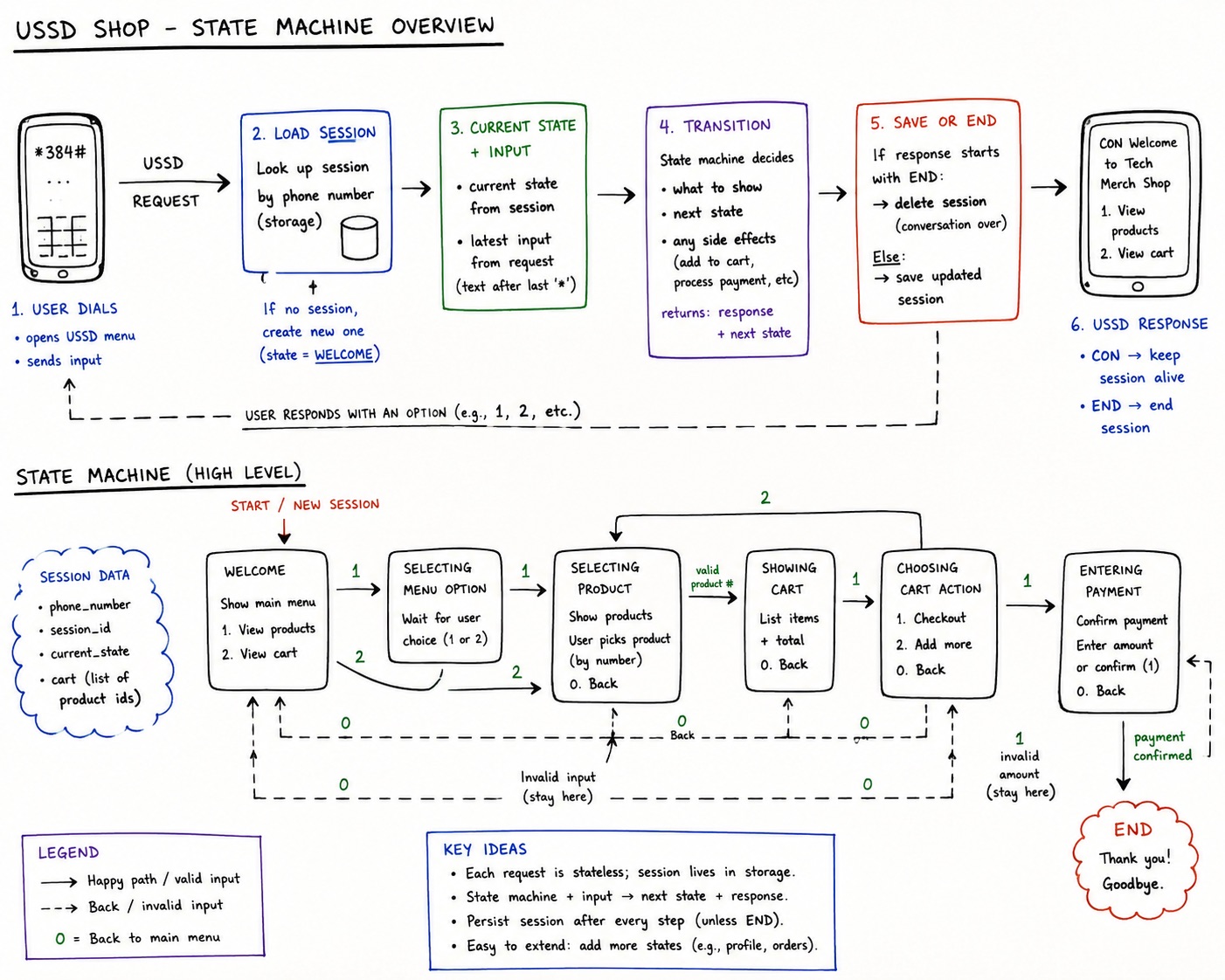
That’s it. If you are trying to implement this. You do not need to follow what I did I’m not perfect and you can probably do better. The take away should be the principles. This diagram is not random. It is for a demo I built for this article.
# Show me the code.
When I was planning this article, I thought snippets would be enough but I ended up building a simple merch shop using Mobile Sasa. So before the code, let use look at some screens.
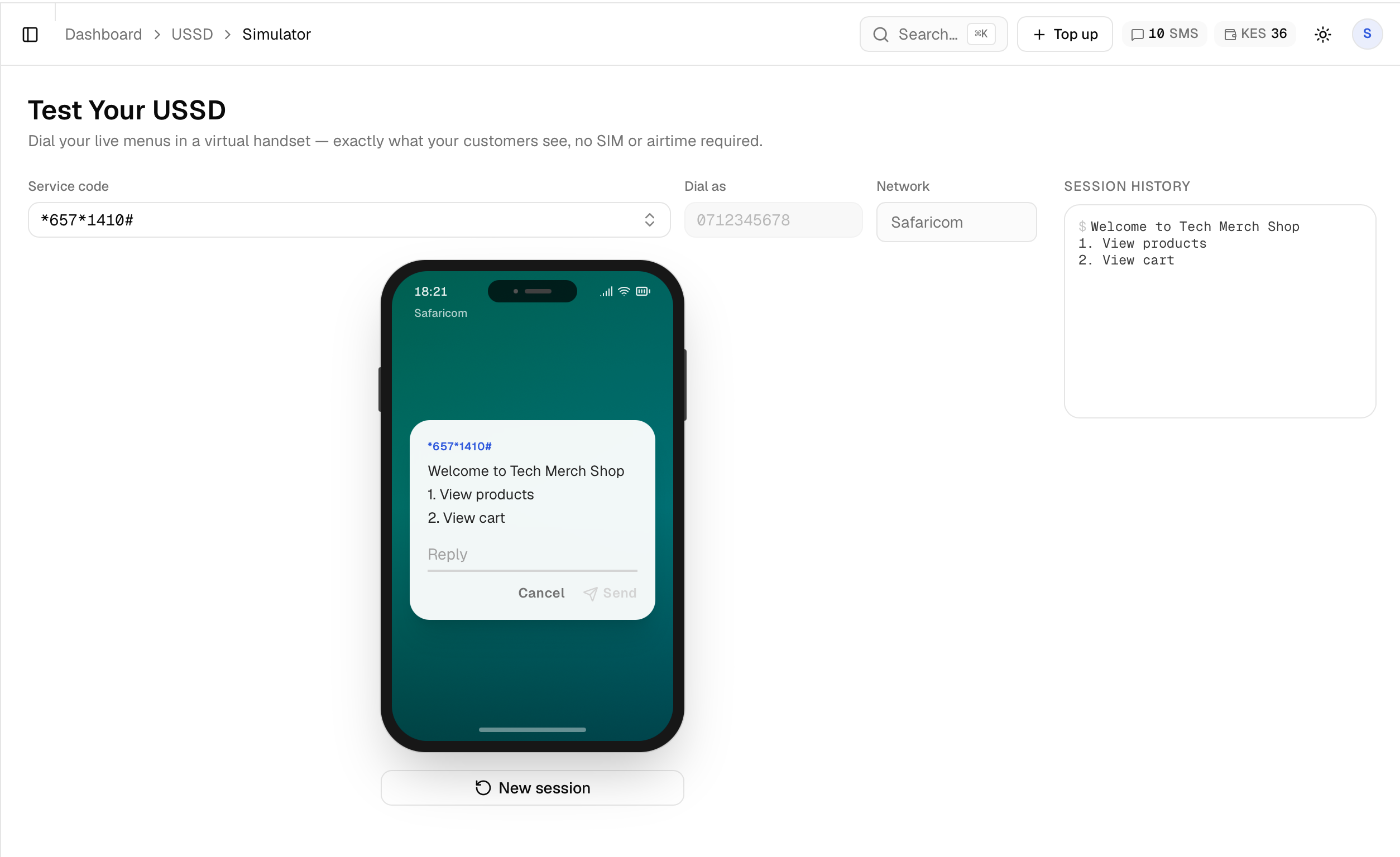
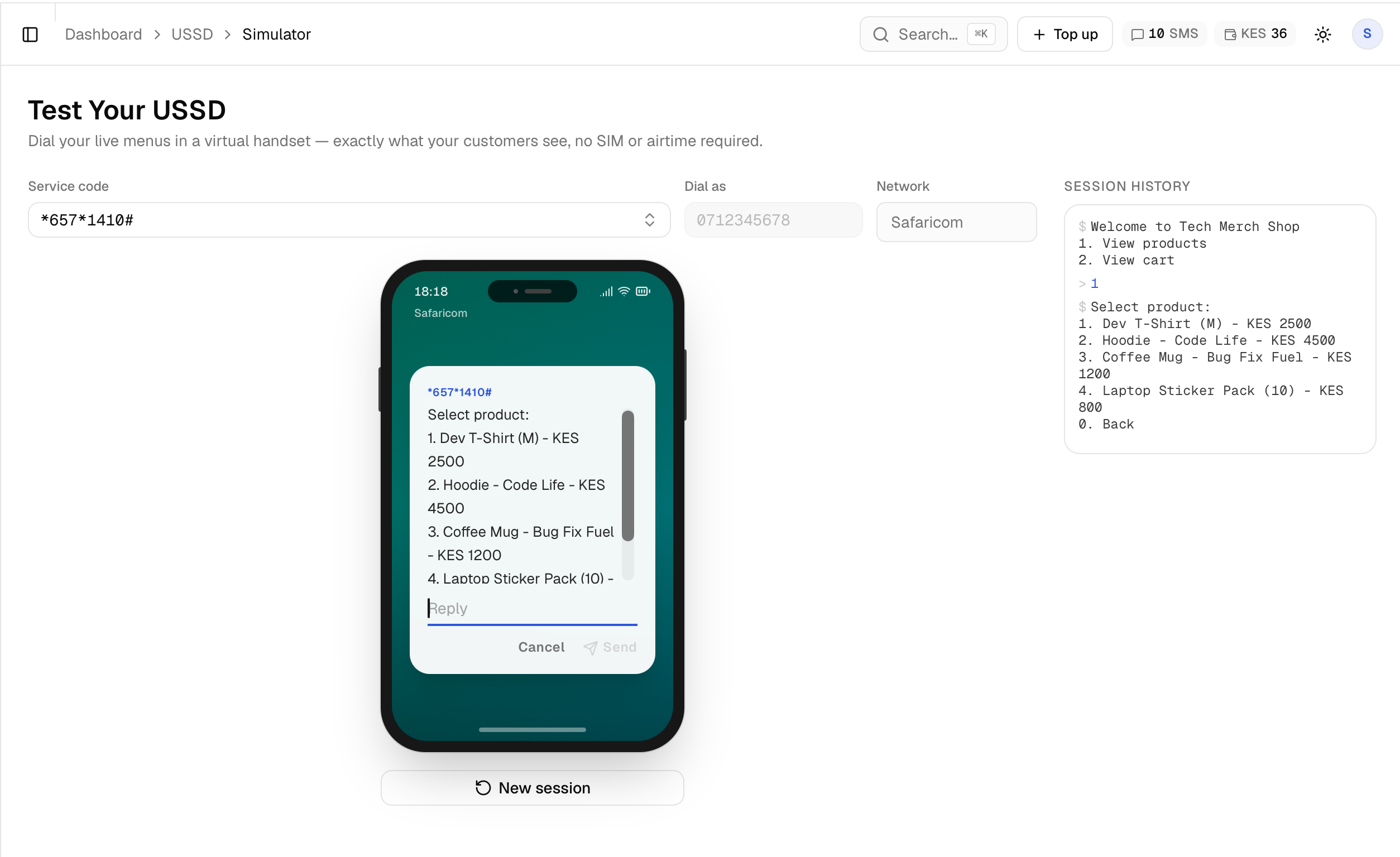
The above screenshots are from Mobile Sasa’s simulator. If you want to see the full experience, I built a demo for it here https://github.com/StanleyWorks/ussd-demo
It is a summary of what we have discussed here plus some bonuses like how to get input, loading products from a database and it is also showing off <Nitro.build>.
While not tested, the code should also work with AfricasTalking as promised in the tweet.
# Outro
I hope you enjoyed reading this article. If you want more deep dives or have any comments feel free to hit me up on my socials or email [email protected]
I’d also like to thank mobilesasa.com for giving me credits to try this out.
Happy coding.